
- Agentic AI
- AI agents
- Customer Zero
- Zoho
- Finance
Setting up an AI agent in a Swiss company: what our own finance agent taught us
Setting up an AI agent, seen from the inside: how Djtal's finance agent Émile went from a written role to running our Zoho Books accounting, supervised.
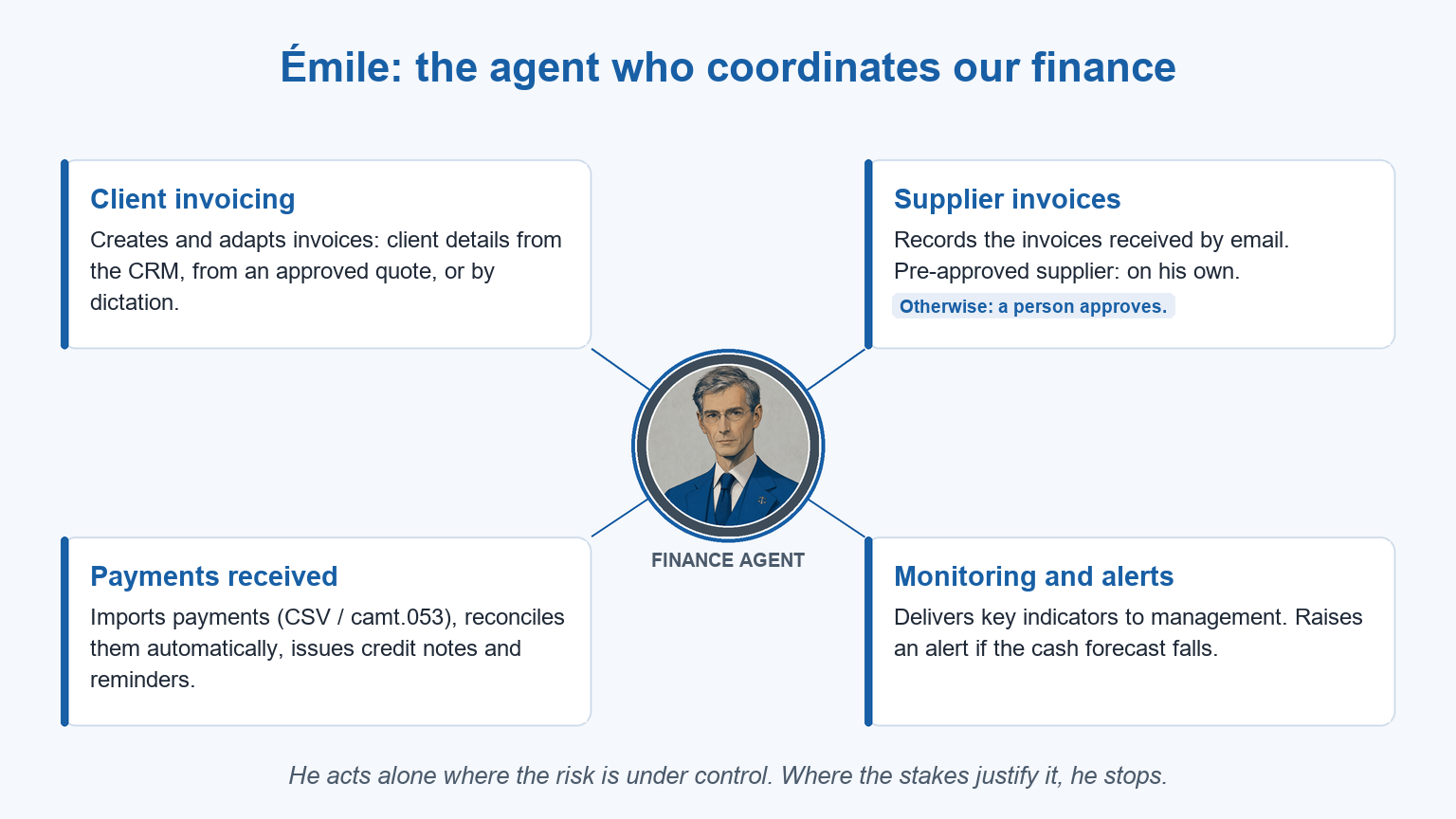
At Djtal, setting up an AI agent means writing its role first, then connecting it to the tools the company already uses, then adjusting its supervised scope with use. Our finance agent, Émile, was set up this way. He now creates our invoices, records those from pre-approved suppliers, reconciles bank payments and alerts management when the cash forecast falls. His story, told from the inside, shows what each step involves in practice.
It starts with a written role, before any connection
Before Émile touches anything, his scope is written down as finance and accounting, and nothing else. This is the step people skip most often, and it is the one that makes an agent reliable. The role, set out in black and white, says what he does and where his responsibilities end. Everything starts there; technology comes after.
He connects to the tools we already use
When his session opens, Émile connects on his own to our Zoho Books account, our mailboxes and Zoho WorkDrive, where supplier invoices arrive and where our documents live. He works where our data already is, in the tools we were already using. Applied agentic AI is about connecting the agent to the systems a company already runs. The agent is quick to set up and earns its keep within the first few weeks.
What Émile runs today
Émile covers several areas of our finance at once.
For client invoicing, he creates an invoice on request. He pulls the client’s details from our CRM, starts from an approved quote or adapts an existing invoice by dictation.
For supplier invoices, he reads each invoice that arrives by email and records it himself when the supplier is pre-approved. If the supplier is known but not yet pre-approved, he prepares the entry and stops, and a person confirms it before it goes into the books. His level of autonomy is set by the level of risk.
For payments received, he imports the bank’s payment file (CSV or camt.053) and reconciles payments automatically. He issues credit notes when needed and sends reminders to clients whose payments are overdue.
For monitoring, he gives management its key financial indicators and raises an alert on his own if the cash forecast falls. We are now training him to go further and run a full review of the accounts.
Émile coordinates our finance work, connected to the tools we already had.
Oversight keeps all of this safe
The set-up stays supervised, and it rests on one simple principle: the agent acts alone where the risk is under control. Where the stakes justify it, he stops and asks for approval. The classic example is the line between a pre-approved supplier and one that still needs approval. The agent refers the borderline case to a person and waits for a decision. The scope is adjusted as experience builds.
A sequence we now repeat
This sequence is our standard method, refined each time we apply it. We define the role in writing, connect the agent to the tools already in place and adjust its supervised scope over time. Real value shows within the first few weeks. For Émile, that meant a finance-only role on paper first, then the connection to Zoho Books, then an approval threshold for suppliers.
Which AI model for your agent?
The candidates are Claude (Anthropic), ChatGPT (OpenAI), Gemini (Google) or the AI already built into your tool, such as Zia in Zoho. The right choice depends on the task, the nature of your data and your requirements. That includes where your data is processed, a sensitive question for any Swiss company. Read the detailed criteria and why we choose the model last.
Where to start in your company
A good first case resembles Émile’s work, a regular workflow whose result you can check to the franc. In your company, that might be invoice follow-up, CRM enrichment or document preparation. Start with one narrow case. Once it has proved itself, widen the scope at your own pace.
Six other agents run our processes alongside Émile, scoped in the same way. See how we design and run them. For the wider picture, read our overview of agentic AI. For everything we do with Zoho, see our Zoho services.
Frequently asked questions
What is the first step in setting up an AI agent?
Setting up an AI agent starts with a written role. At Djtal, that role sets out the agent’s scope, what it does on its own, what it submits for approval and where it stops. Connecting it to your tools comes afterwards. Émile’s role was written this way, covering finance and accounting and nothing else.
Does an AI agent need new tools?
No. An AI agent connects to the tools already in place, which for us means Zoho Books, our mailboxes and Zoho WorkDrive. The data is already there. The agent reads and updates it within a supervised scope, which makes it cost-effective from the first weeks.
How does an AI agent stay under control?
An AI agent stays under control through written thresholds. Émile records an invoice from a pre-approved supplier on his own and stops to ask for approval when the supplier is not yet approved. Every action is logged, and the scope is adjusted with use.
In 30 minutes, we can identify with you the first agent worth setting up in your company. Book a call at a time that suits you.
A topic worth exploring for your business?
Let's spend 30 minutes on your context and find where AI can help your business.
Speak to one of our experts